


Blue Tees GAME: AI Golf GPS
4.8225.00 Reviews
App Specs
- Version
- 1.17.0
- Updated On
- License
- Free
- Downloads
- 50,000+
- Developer
- Blue Tees Golf
- Categories
- Sports
- Platform
- Android
Screenshots
 Analysis by AppCompare
When I choose a golf app, I want more than a map full of numbers: I need something I can glance at between shots without losing track of the group, and a way to review my round afterward. Blue Tees GAME: AI Golf GPS is built around that mix of on-course guidance and game tracking. It is a free sports app from Blue Tees Golf, with optional in-app purchases, and its strongest case is for golfers who want GPS, scoring, and stats in one place rather than a separate tool for each task.
What to consider before a round
The first question is how you actually play. If you mainly want a quick distance check and already keep score on a card, a basic GPS app or the course’s own scorecard may be enough. If you like to look back at how a round unfolded, track shots, or use course maps to think through a hole, a more connected tool has a better chance of earning space on your phone.
This app’s store description points to an AI caddie, stats, scores, and maps, so it aims to support several parts of the round rather than only show yardages. I’d think of it as a companion for decisions and record-keeping, not a replacement for judgment. Wind, lie, confidence, and the shot you can reliably hit still matter more than any screen suggestion.
One practical question is whether your regular course is covered. The app includes a range of courses, but coverage is not universal; I would check the courses you play most often before building a routine around it. That matters especially if your golf is mostly at smaller or less familiar venues, where a missing map can make the app less useful at the exact moment you wanted it.
Getting to Know Blue Tees GAME
First off, let me tell you, downloading and setting up Blue Tees GAME: AI Golf GPS was a breeze. Available for both Android and iOS, it’s like having a personal caddy right in your pocket. The app is designed to offer an intuitive user experience, and it certainly delivers. From the moment you open it, the interface is clean and straightforward, making navigation a piece of cake.
Where its all-in-one approach helps
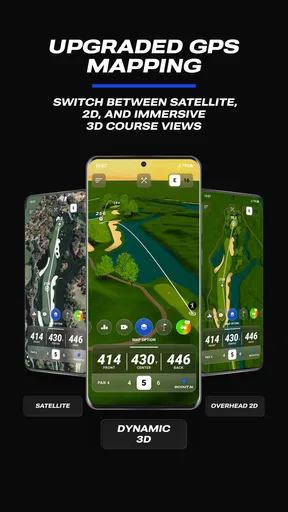
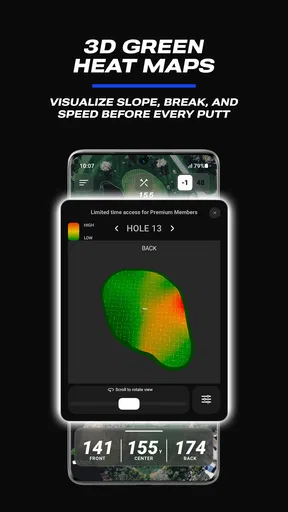
On a busy course, the best feature is often the one that saves attention. A map and distance view can help me compare a conservative lay-up with a more ambitious line, while score entry and shot notes can keep the round’s details from disappearing by the time I get home. That combination is especially useful for a golfer who is trying to learn whether missed greens come from poor distance choices, inconsistent contact, or simply taking on shots that do not suit their game.
For example, imagine arriving at a hole with trouble near the landing area. Rather than choosing a club just because it usually goes a certain distance, I can use the course view to think about where a safer target might be, then record what I actually played. The value is not that an app makes the decision for me; it is that the map and the later record can make the decision easier to understand. That is a more useful habit than checking a number and forgetting the context.
Worth Reading Before You Choose

Flipboard Shows What News Apps Must Do Beyond the Feed

Switching to Android Auto Means Rethinking Your Driving Routine

Google Calendar Makes a Crowded Week Easier to Manage

Ludo King Makes the Most of the Minutes Between Plans

Baby Panda World Brings Quick Play to Modern Phones, but Its Game Library Feels Busy

ESPN’s Live Game View Makes Following Close Games Easier
There is also a useful distinction between live guidance and post-round learning. GPS and maps are most valuable when I am choosing a target; stats become valuable when I have enough rounds to notice patterns. If I only open the app occasionally, I may enjoy the first part without getting much from the second. Regular, accurate score and shot entry is what turns tracking into something actionable.
Features That Stand Out
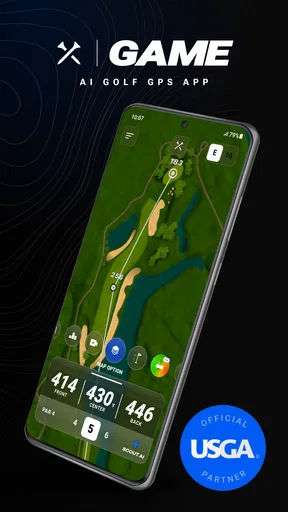
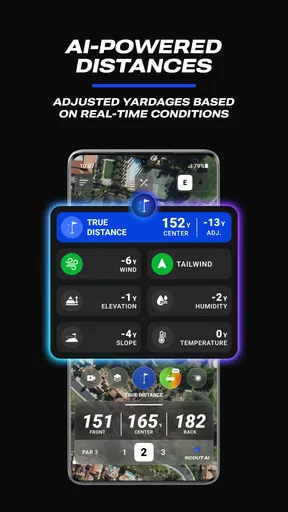
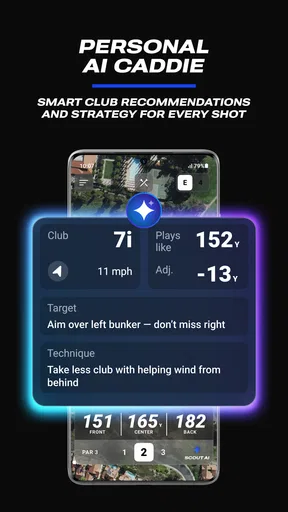
Now, let’s dive into the nitty-gritty. The app boasts a range of features, but a few really stand out. The AI-powered GPS is top-notch, providing you with real-time distances to the green, hazards, and more. It’s like having a pair of eagle eyes, helping you make those crucial decisions on the course.
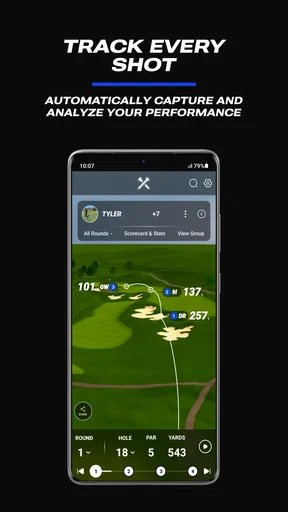
Another cool feature is the shot tracking. With this, you can keep tabs on every stroke, giving you a detailed overview of your game. It’s a fantastic way to analyze your performance and see where you can improve. Plus, the app syncs with wearable devices, which is a neat little bonus.
My main tip is to keep the first few rounds simple. If you try to record every detail while you are still learning the interface, you risk slowing down play or missing the conversation around you. Start with scores and the shots you most want to understand, such as penalty strokes or approaches that repeatedly leave a difficult next shot. Once that routine feels natural, add more detail only if it helps answer a real question about your game.
Wearable support may make checking information more convenient for golfers who already use a compatible device, but I would not choose the app on that point alone. The phone remains the fallback for reviewing a map or entering information, and a screen is still a distraction if you consult it before every stroke. The sensible workflow is to check the hole early, make a plan, then put the device away until the next decision point.
How it compares with simpler options
Compared with a paper scorecard, a phone-based tracker can preserve more detail and make later review easier, but it asks for more attention during the round. Compared with a GPS-only tool, the appeal here is the broader combination of maps, scoring, and performance records. A dedicated rangefinder may suit someone who wants a quick distance reading and dislikes handling a phone; a basic scorekeeping method may suit someone who values an uninterrupted round more than analysis.
Those alternatives are not inferior by default. A golfer who plays casually, rarely reviews stats, or prefers to leave the phone in a bag may get little from extra tracking. Likewise, someone who already has a reliable routine with another golf platform should weigh the effort of changing habits against the features they would actually use. The better choice is the one that fits the way you play, not the one with the longest feature list.
The Social Element
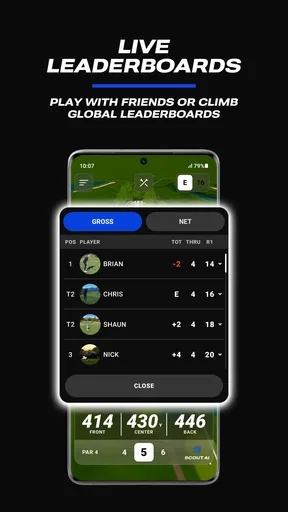
What’s golf without a bit of friendly competition, right? Blue Tees GAME integrates a social aspect where you can connect with fellow golfers. You can share your scores, set up matches, and even participate in tournaments. It adds a fun and engaging dimension to your golfing experience.
This part will matter most if the people you play with are also happy to use the app. It can make a casual match easier to follow and give a group another way to keep the score involved, but social tools are only as useful as the group’s willingness to participate. If your regular foursome prefers a quick verbal agreement and a card, there is no need to turn a relaxed round into a setup exercise.
Costs, device habits, and practical trade-offs
The app is free to download, while optional purchases range from $14.99 to $99.99 per item. I would treat that as a reason to explore the basic experience before spending, then decide whether any paid option addresses a specific need in your own routine. A purchase makes more sense when you know you will use the relevant tools repeatedly, rather than because you assume every golfer needs every upgrade.
It is rated for Everyone and has a 4.9 average from around 3.3 thousand ratings, with more than 50 thousand installs. Those figures suggest that it has found an audience, but they cannot tell you whether its course coverage, tracking style, or paid options fit your particular needs. The current version is 1.13.1, and the app requires Android 10 or later; iOS golfers can also use it.
There is a real device trade-off to plan for: prolonged GPS use can drain a phone battery. I would start a round with a good charge, avoid leaving the display on between shots, and consider whether you need every tracking detail turned on for that day. If you are walking a long round with a phone that already struggles to last until evening, a simpler distance tool or a dedicated device may be the less stressful choice.
A Few Bumps Along the Fairway
Of course, no app is perfect. While Blue Tees GAME offers a lot, there are a couple of areas where it could improve. For instance, the battery consumption can be a bit heavy, especially during prolonged use. It’s something to keep in mind if you’re planning a long day on the course.
Additionally, while the app covers a wide range of courses, there are still some lesser-known ones missing from the database. It’s not a dealbreaker, but it would be nice to see more updates in this area.
That course-coverage limitation is worth checking before a trip, not after you have arrived ready to play. If a course is not represented as you need it to be, the app may still have a role in recording your round, but its map-based guidance will not be the reason to rely on it there. For golfers who rotate among unfamiliar local courses, confirming coverage in advance is a small step that can prevent a frustrating first tee experience.
Who I’d recommend it to
I’d recommend it to golfers who enjoy looking for patterns in their scores, want course context alongside distance guidance, and are comfortable checking a phone during a round. It also makes sense for a group that likes friendly competition and can agree on a consistent way to record scores. Beginners may find the maps and score history helpful for learning course management, provided they focus on simple decisions instead of trying to optimize every shot.
I would skip it if your priority is a distraction-free walk, you do not want to enter information as you play, or your usual courses are not covered. It is also not a substitute for lessons or deliberate practice: a collection of stats can point toward a weakness, but it cannot explain your swing or fix it. If you would never review the information after a round, a basic scorecard or distance-only option may be a better fit.
Wrapping It Up
All in all, Blue Tees GAME: AI Golf GPS is a fantastic tool for any golfing enthusiast. It combines practicality with a touch of fun, making it a must-have for your next round. Whether you're a seasoned pro or just starting out, this app is sure to enhance your game.
So, gear up and give it a whirl! You might just find yourself shaving a few strokes off your score. And who knows? Maybe you’ll even hit that elusive hole-in-one.
My recommendation
I’d try it first on a familiar course, where you can judge whether the map, distance checks, and score workflow feel helpful rather than distracting. Keep your first round focused on a few useful records, and review them afterward to see whether they answer a question you care about. If that process makes your next round more thoughtful, the app is doing worthwhile work; if it adds screen time without changing a decision, stick with a simpler setup.
Pros
- Accurate distance measurements for shots.
- User-friendly interface with clean design.
- Real-time AI assistance for shot improvement.
- Comprehensive course mapping available.
- Offline mode for remote course access.
Cons
- Limited free features without subscription.
- Occasional GPS lag in dense areas.
- High battery consumption during use.
- Requires strong internet for AI features.
- Limited language support for tutorials.
FAQs for Blue Tees GAME: AI Golf GPS
What features does Blue Tees GAME: AI Golf GPS offer?
Blue Tees GAME: AI Golf GPS provides precise GPS mapping for over 40,000 golf courses worldwide. It includes AI-powered shot tracking, club recommendations, and real-time weather updates. The app also offers performance analytics to help improve your game and shareable scorecards for easy social sharing with friends.
Is Blue Tees GAME: AI Golf GPS available offline?
Yes, Blue Tees GAME: AI Golf GPS allows you to download course maps for offline use. This feature ensures you can access all necessary data even when you have limited or no internet connectivity, making it a reliable companion on the course regardless of network availability.
How accurate is the GPS feature in Blue Tees GAME: AI Golf GPS?
The GPS feature in Blue Tees GAME: AI Golf GPS is highly accurate, using advanced satellite technology to provide precise yardage measurements. It ensures golfers have reliable distance information to the front, middle, and back of the green, as well as hazards and other course features.
Does the app provide any game improvement features?
Yes, Blue Tees GAME: AI Golf GPS includes AI-driven performance analytics which offer insights into your playing style. It tracks shots, suggests club choices, and analyzes your game, helping you identify areas for improvement and optimize your strategy on the course.
Are there any subscription or in-app purchases required?
Blue Tees GAME: AI Golf GPS offers both free and premium features. While the basic version provides essential golf GPS functionalities, a subscription unlocks advanced features like AI insights, detailed analytics, and additional customization options. Users can decide based on their specific needs and preferences.


